最近课题组里面要用 QCAT 分析一些从手机里面采集出来的高通基带的数据. 这个 “重任” (其实当时我们并不觉得这是什么重任, 毕竟就是个用 QCAT 导出数据的活) 落到了我头上. 于是我用一个小数据样本开始折腾 QCAT 导出. 在小样本上, 导出还算顺利; 但最终当我们需要在所有 (~300GB) 的 log 中导出数据的时候, 我们遇到了显著的问题, 无法一次性打开这些文件 (QCAT 会慢的要死, 打开所有的文件可能需要半个小时? 但是谁知道 QCAT 到底有没有动, 是不是直接就死掉了), 需要一个一个完成. 既然如此, 写脚本就是必要的了. 于是我和 QCAT 的脚本斗争了两三天, 气得要死; 在和学长讲应该如何使用的时候, 学长表示,
你这应该记录下来, 不然过个几个月就又没有人知道该咋整了.
故作此.
什么是 tmd QCAT
(from ChatGLM)
高通QCAT是一款专为高通芯片设备设计的诊断日志分析工具,其核心功能在于深度解析设备运行过程中生成的底层诊断数据。该工具能够将原始的二进制日志文件(如.dmc或.qmdl格式)解码为人类可读的结构化信息,全面覆盖无线通信协议栈的各个层面,包括但不限于信令交互、数据传输、射频参数及系统状态。通过强大的过滤与搜索机制,用户可精准定位特定事件或异常片段,例如追踪VoLTE呼叫建立失败的具体信令节点,或分析LTE/NR网络切换过程中的参数冲突。同时,QCAT提供多维度的可视化分析能力,将复杂的协议流程、信号强度变化、吞吐量波动等数据转化为直观的图表与时序图,辅助工程师快速识别性能瓶颈。此外,工具支持生成结构化分析报告,并可通过脚本接口实现自动化处理,显著提升大规模日志的排查效率。其功能设计聚焦于通信问题的根因定位,从协议一致性验证到射频异常捕获,为设备调试与网络优化提供关键的技术支撑。
通过命令行导出数据
QCAT 的文档中介绍了两种方式, 一种是通过命令行导出数据, 一种是通过 Python wrapper 导出数据. 对于命令行方式, 其给出了一些参数; 对于 Python, 其给出了一些示例.
首先我尝试了通过命令行导出数据. 按照文档, 如果要使用命令行导出大致如下:
The format of analysis output command is as follows:
2
3If the name of a log file is given, then that file will be processed. If a directory is given, it will look for all .qmdl files within that directory, merge them, then run analysis on the merged file.
我们的 log 都是 hdf 文件, 所以这样就没法给他扔一整个文件夹了, 只能一个一个喂给他.
然后我就写了一行:
1 | & "C:\Program Files\Qualcomm\QCAT7\Bin\QCAT.exe" ` -export "07-27.16-34-28-451.hdf" |
看看会导出什么. 于是, QCAT 导出了一坨大的, 一个文件夹底下有一万个文件. 所以… QCAT 到底导出了什么?
经过了我的一番尝试, 我发现这个 export 功能会导出 “当你打开 QCAT 的时候 displays 栏里面所有勾选的内容”… 也就是说, 你需要 先确定你要导出什么, 再用脚本导出.
本来我以为这已经够逆天了, 结果我看到:
The analyzer option lets the user specify which analyzer they want to run. The names of the analyzers are in the format Name of Workspace; subfolder; Name of Analyzer. For example, if a user wants to run LTE PDCP DL Stats Summary, as shown in Figure 5-1, the command for this would be:
>-export -analyzer=”QCAT Sample;LTE;Summary;LTE PDCP Summary;LTE PDCP DL Stats Summary” mylogfile.hdf
我满心欢喜, 原来可以 Filter 啊! 于是赶忙添加了 Filter, 结果还是吐出来一大坨东西…
所以, 我请问了?
于是我老老实实开始在 QCAT 里面选择我要导出什么. 我清除了 Sample 中的所有东西, 选择了 User Workspace 的部分 Grid. 关闭 QCAT 后, 我又跑了一遍上述命令, 结果, 还是给我输出了一万个默认的 Grid. 怎么回事呢, 我请问了?
然后我又打开了 QCAT, 发现默认 Workspace 的那些 Log 又被勾选了, 重复好几次都没能取消选中. 我想, 得了, 别管了, 就这么用吧.
于是我写了一个 Python 脚本, 遍历某个指定目录里面的所有子目录的所有 hdf 文件, 然后使用 QCAT 导出. 万万没想到, 这个脚本越跑越慢, 后来, QCAT 干脆就打不开了. 为什么呢?
然后我实在受不了, 打开了任务管理器, 发现 QCAT 在打开的时候疯狂地读某一个文件. 我又打开了资源监视器, 它告诉我文件是 C:\Users\Admin\AppData\Local\QCAT.config. 不就是个配置文件嘛… 怎么要读这么久? 我打开文件管理器:

What the FUCK??? 这个配置文件有 8GB 大???
由于这个文件有 8GB 大, 我在 Windows 上面找不到一个可以很好打开并浏览其内容的工具. 所以我索性直接删掉了这个文件. 结果, 我之前的选项被清空了, 剩下的又回到了全选的状态.
后来我又看到了有
The workspace (-workspace=) option allows you to specify a workspace file to use instead of the default workspace loaded.
-export -analyzer=”/user/MyWorkspace.aws” mylogfile.hdf
你别问我为什么上面说的 -workspace, 底下写的 -analyzer… 我他妈不知道这个文档是怎么写的, 你们写文档的他妈的没有校验过吗???
但是不管怎样, 我知道了 QCAT 可以自己造一个工作区. 于是我 Save As 了一份当前的 User Workspace, 准备魔改. 我 Save 到了我自己的文件夹里面, 结果, 我找了 5min 愣是没找到如何 Open Workspace. 准确的说, Open Workspace 是个特殊的对话框, 里面会给你几个识别的 Workspace 让你选. 但是它 并没有 提供一个按钮让你在操作系统里面找文件. 换句话说, 只有 C:\Program Files\Qualcomm\QCAT7\Workspaces 里面的 .aws 文件才会在 QCAT 中被显示出来. 紧接着问题又来了, 我的额外的工作区在 QCAT 里面是 只读 的, 没有 “Edit” 选项, 没法往里面添加 Grid… 于是只能在 User 工作区里面添加需要的 Grid, 然后 Export Item, 然后把导出的 .awsi 文件用 VSCode 打开, 然后复制里面的 Grid XML 到自己的工作区里面, 然后重启 QCAT.
最后我总算是把自定义的工作区弄好了, 然后选中自定义的工作区, 选择需要导出的东西之后关闭, 再次打开总算是记住了需要导出的内容, 不会瞎搞了.

但是尽管如此, 有时候莫名其妙出现的 1GB 大的 config 文件的问题依然没有解决 (也没有找到具体的原因). 于是我使用了大抽象方式: 我删掉现有的 config, 打开一个 QCAT, 选中我需要的工作区和我需要的 log, 关掉 QCAT. 此时, QCAT 会生成一个正常的 ~100kb 的 config. 我直接使用 Windows 的喵喵文件权限管理功能, 勾选 “只读”, 在 “安全” 窗口里面给 everyone 增加了一个 “拒绝写入” 的条目 — 这下没人能更改这个 config 文件了 (当然, 你可以重命名这个文件以实现 更改 的功能, 但是 QCAT 不会这样).
终于! 我的脚本可以正常运行了. 组里面有两台装了 QCAT 的机器, 一台台式机, 一台笔记本. 本来我是在笔记本上面开发的, 当我开始运行的时候, 我发现它异常缓慢… 我打开任务管理器, 就看到 CPU 只有 1.4GHz. 我一脸懵逼地下载了 HWInfo, 然后发现它的 CPU 只有 7W, 而且, Limiting Factor 是 Power… 也就是说, 这台电脑的 PL1 是 7W…
我 不 理 解 !
于是后来我开始使用台式机提取 Log, 代码如下 (当然, 大部分是 Claude 写的; 本来里面有一些中文和符号 (Claude 的最爱), 但是在跨过 RDP 粘贴的时候, 这些玩意全都变成 ?? 了):
1 | #---------------------------------------------------------------------------- # Parse.py #---------------------------------------------------------------------------- import os import sys import glob import time import subprocess import json import threading import random from pathlib import Path from typing import List, Tuple, Set from concurrent.futures import ThreadPoolExecutor, as_completed #---------------------------------------------------------------------------- # ???????(??Windows) #---------------------------------------------------------------------------- import ctypes def is_admin(): try: return ctypes.windll.shell32.IsUserAnAdmin() except: return False if not is_admin(): print("\nERROR: ??????????????\n?????????????????PowerShell,?????????\n") sys.exit(1) #---------------------------------------------------------------------------- # State management functions #---------------------------------------------------------------------------- # Thread lock for state file operations state_lock = threading.Lock() def get_state_file_path(output_folder: str) -> Path: """Get the path to the state file that tracks processed files.""" return Path(output_folder) / ".qcat_processing_state.json" def load_processed_files(output_folder: str) -> Set[str]: """Load the set of already processed files from the state file.""" state_file = get_state_file_path(output_folder) if state_file.exists(): try: with open(state_file, 'r', encoding='utf-8') as f: data = json.load(f) processed_files = set(data.get('processed_files', [])) print(f"\nLoaded state: {len(processed_files)} files already processed") return processed_files except (json.JSONDecodeError, IOError) as e: print(f"Warning: Could not load state file ({e}). Starting fresh.") return set() def save_processed_file(output_folder: str, file_path: str): """Add a successfully processed file to the state file. Thread-safe.""" with state_lock: # Ensure thread-safe access to state file state_file = get_state_file_path(output_folder) # Load existing state processed_files = load_processed_files(output_folder) # Add new file processed_files.add(file_path) # Save updated state try: state_data = { 'processed_files': list(processed_files), 'last_updated': time.strftime('%Y-%m-%d %H:%M:%S') } with open(state_file, 'w', encoding='utf-8') as f: json.dump(state_data, f, indent=2, ensure_ascii=False) except IOError as e: print(f"Warning: Could not save state file ({e}). Continuing without state tracking.") def clear_state_file(output_folder: str): """Clear the state file (useful for restarting from scratch).""" state_file = get_state_file_path(output_folder) if state_file.exists(): try: state_file.unlink() print(f"Cleared state file: {state_file}") except IOError as e: print(f"Warning: Could not clear state file ({e}).") def filter_files(files: List[Path]) -> List[Path]: blacklist = ["??", "??", "??", "??"] for pattern in blacklist: files = [file for file in files if not any(part in file.name for part in pattern.split())] return files #---------------------------------------------------------------------------- # find_qcat_files() # Recursively find all QCAT log files in the given directory #---------------------------------------------------------------------------- def find_qcat_files(input_folder: str) -> tuple[Path, List[Path]]: """ Find all QCAT log files recursively in the given folder. Common QCAT file extensions: .hdf, .qmdl, .qmdl2, .dlf, .isf Windows compatible path handling. """ qcat_extensions = ['*.hdf', '*.qmdl', '*.qmdl2', '*.dlf', '*.isf'] qcat_files: list[Path] = [] print(f"\nSearching for QCAT files in: {input_folder}") input_path = Path(input_folder) if not input_path.exists(): print(f"ERROR: Input folder does not exist: {input_folder}") return input_path, [] for ext in qcat_extensions: # Use pathlib for Windows compatibility files = list(input_path.rglob(ext)) qcat_files.extend(files) # Remove duplicates and sort qcat_files = sorted(list(set(qcat_files))) # Strip common prefix (input folder) qcat_files = [file.relative_to(input_path) for file in qcat_files] qcat_files = filter_files(qcat_files) print(f"Found {len(qcat_files)} QCAT log files:") for file in qcat_files: print(f" {file}") return Path(input_folder), qcat_files #---------------------------------------------------------------------------- # Single file processing function for thread pool #---------------------------------------------------------------------------- def process_single_file(args: tuple) -> tuple[str, bool, str]: """ Process a single QCAT file. Designed to be used with thread pool. Args: args: Tuple containing (input_path_full, output_path, file_key, output_folder) Returns: tuple: (file_key, success_flag, error_message) """ input_path_full, output_path, file_key, output_folder = args # Add a random delay time.sleep(0.5 * random.randint(0, 15)) # To avoid opening too many QCAT at same time try: # Create output directory output_path.mkdir(parents=True, exist_ok=True) print(f"?? [Thread {threading.current_thread().ident}] Processing: {input_path_full.name}") print(f" Output: {output_path}") # Run QCAT command result = subprocess.run([ "C:\\Program Files\\Qualcomm\\QCAT7\\Bin\\QCAT.exe", "-export", # "-workspace=C:\\Users\\DELL\\Desktop\\ajax\\ws.aws", "-delimiter=,", f"-outputdir={output_path}", str(input_path_full) ], check=True, capture_output=True, text=True) print(f"? [Thread {threading.current_thread().ident}] Successfully processed: {file_key}") # Save state immediately after successful processing save_processed_file(output_folder, file_key) return file_key, True, "" except subprocess.CalledProcessError as e: error_msg = f"QCAT command failed: {e}" if e.stderr: error_msg += f"\nStderr: {e.stderr}" print(f"? [Thread {threading.current_thread().ident}] Failed to process {file_key}: {error_msg}") return file_key, False, error_msg except Exception as e: error_msg = f"Unexpected error: {e}" print(f"? [Thread {threading.current_thread().ident}] Failed to process {file_key}: {error_msg}") return file_key, False, error_msg def process_multiple_files(base_dir: tuple[Path, List[Path]], output_folder: str, max_workers: int = 4) -> int: """ Use ThreadPoolExecutor to process multiple QCAT files in parallel. Args: base_dir: Tuple of (input_path, qcat_files) output_folder: Output directory path max_workers: Maximum number of concurrent QCAT processes (default: 4) Returns: Number of successfully processed files """ input_path, qcat_files = base_dir # Load state of already processed files processed_files = load_processed_files(output_folder) # Filter out already processed files files_to_process = [] skipped_files = 0 for input_file in qcat_files: file_key = str(input_file) # Use relative path as key if file_key in processed_files: print(f"?? Skipping already processed file: {input_file}") skipped_files += 1 continue input_path_full = (input_path / input_file).resolve() output_path = (Path(output_folder) / input_file).resolve() files_to_process.append((input_path_full, output_path, file_key, output_folder)) if skipped_files > 0: print(f"\n?? Skipped {skipped_files} already processed files") if not files_to_process: print("?? No files to process") return len(processed_files) print(f"\n?? Starting parallel processing with {max_workers} workers") print(f"?? Files to process: {len(files_to_process)}") successful_files = len(processed_files) # Count already processed files failed_files = [] # Process files using ThreadPoolExecutor with ThreadPoolExecutor(max_workers=max_workers) as executor: # Submit all tasks future_to_file = { executor.submit(process_single_file, args): args[2] for args in files_to_process } # Process completed tasks as they finish for future in as_completed(future_to_file): file_key = future_to_file[future] try: file_key_result, success, error_msg = future.result() if success: successful_files += 1 else: failed_files.append((file_key_result, error_msg)) except Exception as e: error_msg = f"Thread execution error: {e}" failed_files.append((file_key, error_msg)) print(f"? Thread failed for {file_key}: {error_msg}") # Print summary of failed files if failed_files: print(f"\n?? Failed files ({len(failed_files)}):") for file_key, error_msg in failed_files: print(f" - {file_key}: {error_msg}") return successful_files #---------------------------------------------------------------------------- # main function #---------------------------------------------------------------------------- def main(): """ Main function to process all QCAT files in the given folder and export 0xB193 packets. Uses ThreadPoolExecutor for parallel processing (Windows compatible, Python 3.10). Now includes state management to resume from where it left off if interrupted, and parallel processing support with configurable thread count. """ # Check command line arguments if len(sys.argv) < 3: print("\nUsage: python Parse_cmd.py <input_folder> <output_folder> [--clear-state] [--threads=N]") print("\nDescription:") print(" Recursively finds all QCAT log files in input_folder and subfolders,") print(" extracts 0xB193 packets from each file using parallel QCAT instances,") print(" and exports them to Excel format in the output_folder.") print("\nSupported QCAT file extensions: .hdf, .qmdl, .qmdl2, .dlf, .isf") print("\nFeatures:") print(" - Windows compatible with Python 3.10") print(" - Parallel processing: Up to 4 concurrent QCAT instances by default") print(" - Memory efficient: Separate QCAT instance per thread") print(" - Recursive folder search") print(" - Excel export for each file with 0xB193 packets") print(" - State management: Resume processing if interrupted") print("\nOptions:") print(" --clear-state Clear the processing state and start fresh") print(" --threads=N Set number of parallel threads (1-8, default: 4)") print("\nExample:") print(" python Parse_cmd.py C:\\logs C:\\output") print(" python Parse_cmd.py C:\\logs C:\\output --clear-state") print(" python Parse_cmd.py C:\\logs C:\\output --threads=2") print(" python Parse_cmd.py C:\\logs C:\\output --clear-state --threads=6") sys.exit(1) input_folder = sys.argv[1] output_folder = sys.argv[2] # Parse command line options clear_state = '--clear-state' in sys.argv max_workers = 4 # Default # Parse --threads option for arg in sys.argv[3:]: if arg.startswith('--threads='): try: max_workers = int(arg.split('=')[1]) if max_workers < 1 or max_workers > 8: print("ERROR: Thread count must be between 1 and 8") sys.exit(1) except ValueError: print("ERROR: Invalid thread count format. Use --threads=N") sys.exit(1) # Validate input folder using pathlib for Windows compatibility input_path = Path(input_folder) if not input_path.exists(): print(f"ERROR: Input folder does not exist: {input_folder}") sys.exit(1) if not input_path.is_dir(): print(f"ERROR: Input path is not a directory: {input_folder}") sys.exit(1) # Create output folder if it doesn't exist output_path = Path(output_folder) output_path.mkdir(parents=True, exist_ok=True) print(f"Output folder: {output_path.absolute()}") # Handle state clearing if requested if clear_state: clear_state_file(str(output_path)) print("Processing state cleared. Starting fresh.") print(f"?? Configuration:") print(f" Max parallel threads: {max_workers}") print(f" Input folder: {input_path.absolute()}") print(f" Output folder: {output_path.absolute()}") # Find all QCAT files base_dir, qcat_files = find_qcat_files(str(input_path)) if not qcat_files: print("No QCAT log files found in the specified folder.") sys.exit(0) # Show current state processed_files = load_processed_files(str(output_path)) remaining_files = [f for f in qcat_files if str(f) not in processed_files] print(f"\n?? Processing Status:") print(f" Total files found: {len(qcat_files)}") print(f" Already processed: {len(processed_files)}") print(f" Remaining to process: {len(remaining_files)}") if len(remaining_files) == 0: print(f"\n? All files have already been processed!") print(f"Use --clear-state flag if you want to reprocess all files.") sys.exit(0) # Process all files using parallel QCAT instances print(f"\n{'='*80}") print(f"Starting parallel processing of {len(remaining_files)} remaining files...") print(f"Using {max_workers} concurrent QCAT instances") print(f"State will be saved after each successful file") print(f"{'='*80}") start_time = time.time() successful_files = process_multiple_files((base_dir, qcat_files), str(output_path), max_workers) end_time = time.time() processing_time = end_time - start_time # Summary print(f"\n{'='*80}") print("PROCESSING COMPLETE") print(f"{'='*80}") print(f"Total files found: {len(qcat_files)}") print(f"Successfully processed: {successful_files}") print(f"Failed to process: {len(qcat_files) - successful_files}") print(f"Processing time: {processing_time:.1f} seconds") print(f"Average time per file: {processing_time/len(qcat_files):.1f} seconds") print(f"Parallel efficiency: {max_workers} threads") print(f"Output folder: {output_path.absolute()}") if successful_files < len(qcat_files): failed_count = len(qcat_files) - successful_files print(f"\n?? WARNING: {failed_count} files failed to process.") print("Check the console output above for details.") print("You can restart the script to retry failed files.") else: print(f"\n?? All files processed successfully!") print(f"\nLook for files ending with '_0xB193_packets.xlsx' in the output folder.") print(f"State file saved at: {get_state_file_path(str(output_path))}") #----------------------------------------------------------------------------- # Entry point #----------------------------------------------------------------------------- if __name__ == "__main__": main() |
通过 Python 代码导出数据
本来我是觉得用 Python 代码会更好导出数据的, 后来证明我错了. QCAT 提供了一些 Sample Script:
1 | CloseFile.py ConfigTest.py DebugMsgFilter.py EventFilter.py ExportTextAndExcel.py ExtractPcmFiles.py filtermask.py GetLogCodes.py GetVersion.py LogProcessingStatus.py PacketFilter.py PacketWindowSample.py Perl/ TimeStampSample.py TimeWindowSample.py |
但是, QCAT 只 提供了这些 Sample Script…
或者说, QCAT 的 Python Binding 就 只有这些功能…
发现了吗? 它似乎没有导出 Grid 的功能…
所以我一开始尝试了一点之后就放弃了.
后来, 我们要统计总共有多少包, 这次我使用了 Python Binding 来实现.
中间又有一万行委屈的故事, 直接跳到结论吧.
首先, 要用管理员模式打开 Python 脚本, 不然 QCAT 会慢的要死, 原因未知.
然后, QCAT 的依赖库是在脚本里面动态添加的,
1 | from sys import platform if platform == "linux" or platform == "linux2": sys.path.append('/opt/qcom/QCAT7/Support/Python') # 这里也有一行 elif platform == "win32": sys.path.append('C:\\Program Files\\Qualcomm\\QUTS\\Support\\python') sys.path.append('C:\\Program Files\\Qualcomm\\QCAT7\\Support\\Python') |
所以要让 VSCode 能补全这个, 需要
1 | { "python.autoComplete.extraPaths": [ "C:\\Program Files\\Qualcomm\\QUTS\\Support\\python", "C:\\Program Files\\Qualcomm\\QCAT7\\Support\\python" ], "python.analysis.extraPaths": [ "C:\\Program Files\\Qualcomm\\QUTS\\Support\\python", "C:\\Program Files\\Qualcomm\\QCAT7\\Support\\python" ] } |
(虽然最后也没什么可以补的, 所有东西统统都是 Any, 不看 Sample 谁也不会写)
1 | def Set(self, filterType, logCode, bEnable): """ Parameters: - filterType - logCode - bEnable """ self.send_Set(filterType, logCode, bEnable) return self.recv_Set() |
那么传入的参数是什么类型呢? 自己看 Sample 去吧!
不仅如此, 它的 Sample 里面甚至有 语法错误 (比如括号不匹配), 行尾有分号, 等等莫名其妙的问题, 很让人不理解写这个文档和 Sample 的人到底有没有用过 Sample…
还没完! 在命令行参数里面, 你可以传入一个 Filter 文件来配置 QCAT 的 Filter; 在 GUI 里面, 你设置好 Filter 之后可以关闭当前文件, 打开下一个 / 下一组文件, Filter 会自动生效; 但是在 Python Binding 里面 都不会 ! 你必须手动 Parse 这个 Filter File, 一个个设置 Filter, 然后打开一个文件, 然后弄完之后先关闭它, 然后再设置一遍 Filter, 然后才能打开下一个文件…
算了, 能用就行.
1 | #---------------------------------------------------------------------------- # Parse.py #---------------------------------------------------------------------------- import os import sys import glob import time import json import threading from pathlib import Path from typing import List, Tuple, Dict, Optional from concurrent.futures import ThreadPoolExecutor, as_completed #---------------------------------------------------------------------------- # 检查管理员权限(仅限Windows) #---------------------------------------------------------------------------- import ctypes def is_admin(): try: return ctypes.windll.shell32.IsUserAnAdmin() except: return False if not is_admin(): print("\nERROR: 此脚本需要以管理员身份运行。\n请右键以管理员身份运行命令提示符或PowerShell,然后再执行本脚本。\n") sys.exit(1) #---------------------------------------------------------------------------- # QcatClient has dependency on QUTS, so QUTS installation is required #---------------------------------------------------------------------------- from sys import platform if platform == "linux" or platform == "linux2": sys.path.append('/opt/qcom/QCAT7/Support/Python') elif platform == "win32": sys.path.append('C:\\Program Files\\Qualcomm\\QUTS\\Support\\python') sys.path.append('C:\\Program Files\\Qualcomm\\QCAT7\\Support\\Python') import QcatClient import Common.ttypes from QcatClient import QcatAutomationClient #---------------------------------------------------------------------------- # Logging helper functions #---------------------------------------------------------------------------- def log_with_thread(message: str, level: str = "INFO"): """Log message with thread name for better tracking in multithreading""" thread_name = threading.current_thread().name print(f"[{level}][{thread_name}] {message}") def log_thread_minimal(message: str): """Minimal logging for threads to reduce output""" thread_name = threading.current_thread().name print(f"[{thread_name}] {message}") #---------------------------------------------------------------------------- # find_filter_files() # Find all filter files in the Filters directory #---------------------------------------------------------------------------- def find_filter_files(filters_folder: str = "./Filters") -> List[Path]: """ Find all filter files in the Filters directory. Filter files should be .txt files containing packet filter IDs. """ filters_path = Path(filters_folder) if not filters_path.exists(): print(f"WARNING: Filters folder does not exist: {filters_folder}") return [] filter_files = list(filters_path.glob("*.txt")) print(f"\nFound {len(filter_files)} filter files:") for file in filter_files: print(f" {file.name}") return filter_files #---------------------------------------------------------------------------- # find_qcat_files() # Recursively find all QCAT log files in the given directory #---------------------------------------------------------------------------- def find_qcat_files(input_folder: str) -> Tuple[Path, List[Path]]: """ Find all QCAT log files recursively in the given folder. Common QCAT file extensions: .hdf, .qmdl, .qmdl2, .dlf, .isf Windows compatible path handling. """ qcat_extensions = ['*.hdf', '*.qmdl', '*.qmdl2', '*.dlf', '*.isf'] qcat_files: List[Path] = [] print(f"\nSearching for QCAT files in: {input_folder}") input_path = Path(input_folder) if not input_path.exists(): print(f"ERROR: Input folder does not exist: {input_folder}") return input_path, [] for ext in qcat_extensions: # Use pathlib for Windows compatibility files = list(input_path.rglob(ext)) qcat_files.extend(files) # Remove duplicates and sort qcat_files = sorted(list(set(qcat_files))) # Strip common prefix (input folder) qcat_files = [file.relative_to(input_path) for file in qcat_files] print(f"Found {len(qcat_files)} QCAT log files:") for file in qcat_files: print(f" {file}") return Path(input_folder), qcat_files #---------------------------------------------------------------------------- # QcatProcessor class # Manages a single QCAT instance for processing multiple files #---------------------------------------------------------------------------- class QcatProcessor: """ Windows-compatible QCAT processor that maintains a single QCAT instance and processes files by closing/opening within the same instance. """ def __init__(self, client_name: str = "Parser"): """Initialize the QCAT processor with a single instance.""" self.qcat_auto_client = None self.pid = None self.client_name = client_name self.is_initialized = False self.current_file = None self.current_filter = None def initialize(self, filter_file: Optional[Path] = None) -> bool: """ Initialize the QCAT automation client and manager. Returns True if successful, False otherwise. """ try: log_with_thread("Initializing QCAT automation client...") self.qcat_auto_client = QcatClient.QcatAutomationClient(self.client_name) qcatApp = self.qcat_auto_client.getQcatAutomationManager() if qcatApp is None: raise ValueError("Failed to get QCAT automation manager") self.qcatApp = qcatApp self.pid = self.qcatApp.GetProcessID() log_with_thread(f"QCAT pid: {self.pid}") # Load filter file if provided if filter_file is None: raise ValueError("Filter file is required") log_with_thread(f"Loading filter file: {filter_file.name}") self.current_filter = filter_file try: filters = map(int, open(filter_file, encoding="utf-8").readlines()) except FileNotFoundError: log_with_thread(f"Filter file not found: {filter_file}", "ERROR") return False self.filters = [] for f in filters: if f == -1: break self.filters.append(f) log_thread_minimal(f"Loaded {len(self.filters)} filters") self.is_initialized = True log_with_thread("QCAT initialization successful") return True except Exception as e: log_with_thread(f"Failed to initialize QCAT: {str(e)}", "ERROR") return False def process_file(self, base_dir: Path, input_file: Path, output_folder: str) -> Tuple[bool, int]: """ Process a single file using the existing QCAT instance. Creates a subfolder for each input file and generates multiple Excel files. Returns (success, packet_count) tuple. """ if not self.is_initialized: log_with_thread("QCAT not initialized", "ERROR") return False, 0 input_path = (base_dir / input_file).resolve() log_thread_minimal(f"Processing: {input_path.name}") try: # Close current file if one is open if self.current_file: close_result = self.qcatApp.CloseFile() if close_result != 1: log_with_thread("Failed to close previous file", "WARN") self.current_file = None self.qcatApp.SetAll("PacketFilter", 1) def sf(f: int): self.qcatApp.Set("PacketFilter", f, 0) results = list(map(sf, self.filters)) result = self.qcatApp.Commit("PacketFilter") # Open the new log file filePath = str(input_path) if self.qcatApp.OpenLog([filePath]) != 1: log_with_thread(f"Failed to open {input_file}", "ERROR") return False, 0 self.current_file = input_file # Get packet counts total_packets = self.qcatApp.GetPacketCount() visible_packets = self.qcatApp.GetVisiblePacketCount() log_thread_minimal(f"Found {visible_packets}/{total_packets} packets") # Check encryption status only if needed (reduced logging) try: keyInfoStatus = self.qcatApp.EncryptionKeyExchangeStatus() if keyInfoStatus != "Available": # Only log if not standard log_with_thread(f"Encryption status: {keyInfoStatus}", "WARN") except: pass # Suppress encryption status errors in threads return True, visible_packets except Exception as e: log_with_thread(f"Exception while processing {input_file}: {str(e)}", "ERROR") return False, 0 def cleanup(self): """Clean up the QCAT instance.""" try: if self.qcatApp and self.is_initialized: log_thread_minimal("Cleaning up QCAT...") # Close current file if open if self.current_file: try: self.qcatApp.CloseFile() except: log_with_thread("Could not close current file", "WARN") # Exit QCAT try: self.qcatApp.Exit() log_thread_minimal("QCAT exited successfully") except: log_with_thread("Could not exit QCAT cleanly", "WARN") self.is_initialized = False self.current_file = None if self.pid: time.sleep(1) # Give QCAT time to exit cleanly try: import subprocess subprocess.run(['taskkill', '/F', '/PID', str(self.pid)], capture_output=True, check=False) log_thread_minimal(f"Force terminated QCAT process {self.pid}") except: log_with_thread("Could not force terminate QCAT process", "WARN") except Exception as e: log_with_thread(f"Error during cleanup: {str(e)}", "WARN") # On Windows, we could try to terminate the process if self.pid: try: import subprocess subprocess.run(['taskkill', '/F', '/PID', str(self.pid)], capture_output=True, check=False) log_thread_minimal(f"Force terminated QCAT process {self.pid}") except: log_with_thread("Could not force terminate QCAT process", "WARN") #---------------------------------------------------------------------------- # Process single filter file #---------------------------------------------------------------------------- def process_single_filter(filter_file: Path, base_dir: Path, qcat_files: List[Path], output_folder: str) -> Dict: """ Process all QCAT files with a single filter file. Returns a dictionary with results for this filter. """ # Set thread name for better logging thread_name = f"Filter-{filter_file.stem}" threading.current_thread().name = thread_name results = { 'filter_name': filter_file.stem, 'filter_file': str(filter_file), 'total_packets': 0, 'processed_files': 0, 'failed_files': 0, 'file_results': [] } processor = QcatProcessor(f"Parser_{filter_file.stem}") try: # Initialize QCAT with this filter if not processor.initialize(filter_file): log_with_thread(f"Failed to initialize QCAT for filter {filter_file.name}", "ERROR") return results log_with_thread(f"Processing {len(qcat_files)} files with filter: {filter_file.name}") for i, qcat_file in enumerate(qcat_files, 1): # Minimal progress logging every 10 files to reduce output if i % 10 == 1 or i == len(qcat_files): log_thread_minimal(f"[{i}/{len(qcat_files)}] {qcat_file.name}") success, packet_count = processor.process_file(base_dir, qcat_file, output_folder) file_result = { 'file_name': str(qcat_file), 'success': success, 'packet_count': packet_count } results['file_results'].append(file_result) if success: results['processed_files'] += 1 results['total_packets'] += packet_count # Only log individual files if they have packets or fail if packet_count > 0: log_thread_minimal(f"✓ {qcat_file.name} ({packet_count} packets)") else: results['failed_files'] += 1 log_with_thread(f"✗ FAILED: {qcat_file.name}", "ERROR") finally: processor.cleanup() return results #---------------------------------------------------------------------------- # Save results to file #---------------------------------------------------------------------------- def save_results_to_file(all_results: List[Dict], output_folder: str): """ Save the processing results to JSON and summary text files. """ output_path = Path(output_folder) # Save detailed JSON results json_file = output_path / "packet_count_results.json" with open(json_file, 'w', encoding='utf-8') as f: json.dump(all_results, f, indent=2, ensure_ascii=False) print(f"\nDetailed results saved to: {json_file}") # Save summary text file summary_file = output_path / "packet_count_summary.txt" with open(summary_file, 'w', encoding='utf-8') as f: f.write("QCAT Packet Count Processing Summary\n") f.write("=" * 50 + "\n\n") total_all_packets = 0 for result in all_results: filter_name = result['filter_name'] total_packets = result['total_packets'] processed_files = result['processed_files'] failed_files = result['failed_files'] f.write(f"Filter: {filter_name}\n") f.write(f" Total packets found: {total_packets}\n") f.write(f" Successfully processed files: {processed_files}\n") f.write(f" Failed files: {failed_files}\n") f.write(f" Filter file: {result['filter_file']}\n\n") total_all_packets += total_packets f.write(f"GRAND TOTAL PACKETS: {total_all_packets}\n") f.write(f"Total filters processed: {len(all_results)}\n") print(f"Summary saved to: {summary_file}") # Print summary to console print(f"\n{'='*60}") print("FINAL SUMMARY") print(f"{'='*60}") total_all_packets = 0 for result in all_results: print(f"Filter {result['filter_name']}: {result['total_packets']} packets") total_all_packets += result['total_packets'] print(f"{'='*60}") print(f"GRAND TOTAL PACKETS: {total_all_packets}") #---------------------------------------------------------------------------- # Process multiple files with multiple filters in parallel #---------------------------------------------------------------------------- def process_multiple_files_parallel(files: Tuple[Path, List[Path]], output_folder: str, max_workers: int = 10) -> List[Dict]: """ Process multiple QCAT files with multiple filters in parallel. Returns list of results for each filter. """ base_dir, qcat_files = files # Find all filter files filter_files = find_filter_files() if not filter_files: print("ERROR: No filter files found") return [] print(f"\n{'='*80}") print(f"Starting parallel processing:") print(f" Files to process: {len(qcat_files)}") print(f" Filters to apply: {len(filter_files)}") print(f" Max parallel workers: {max_workers}") print(f"{'='*80}") all_results = [] # Process filters in parallel with ThreadPoolExecutor(max_workers=max_workers) as executor: # Submit all filter processing tasks future_to_filter = { executor.submit(process_single_filter, filter_file, base_dir, qcat_files, output_folder): filter_file for filter_file in filter_files } # Collect results as they complete for future in as_completed(future_to_filter): filter_file = future_to_filter[future] try: result = future.result() all_results.append(result) print(f"\n✓ [MAIN] Completed filter: {filter_file.name}") print(f" Total packets found: {result['total_packets']}") print(f" Processed files: {result['processed_files']}") print(f" Failed files: {result['failed_files']}") except Exception as exc: print(f"\n✗ [MAIN] Filter {filter_file.name} generated an exception: {exc}") # Add failed result failed_result = { 'filter_name': filter_file.stem, 'filter_file': str(filter_file), 'total_packets': 0, 'processed_files': 0, 'failed_files': len(qcat_files), 'file_results': [], 'error': str(exc) } all_results.append(failed_result) return all_results # #---------------------------------------------------------------------------- # # Process multiple files with single QCAT instance (original function) # #---------------------------------------------------------------------------- # """ # Process multiple QCAT files using a single QCAT instance. # Returns (successful_count, total_packets) tuple. # """ # processor = QcatProcessor() # # Initialize QCAT once # if not processor.initialize(): # print("ERROR: Failed to initialize QCAT processor") # return 0, 0 # successful_files = 0 # total_packets_exported = 0 # base_dir, qcat_files = files # try: # print(f"\n{'='*80}") # print(f"Processing {len(qcat_files)} files with single QCAT instance...") # print(f"{'='*80}") # for i, qcat_file in enumerate(qcat_files, 1): # print(f"\n[{i}/{len(qcat_files)}] {Path(qcat_file).name}") # success, packet_count = processor.process_file(base_dir, qcat_file, output_folder) # if success: # successful_files += 1 # total_packets_exported += packet_count # status = "✓ SUCCESS" # if packet_count > 0: # status += f" ({packet_count} packets)" # else: # status += " (no packets)" # else: # status = "✗ FAILED" # print(f" {status}") # # Small delay between files for stability # time.sleep(0.5) # finally: # # Always cleanup, even if there was an error # processor.cleanup() # return successful_files, total_packets_exported #---------------------------------------------------------------------------- # main function #---------------------------------------------------------------------------- def main(): """ Main function to process all QCAT files in the given folder and export 0xB193 packets. Uses a single QCAT instance for all files (Windows compatible, Python 3.10). """ # Check command line arguments if len(sys.argv) < 3: print("\nUsage: python Export0xB193Packets.py <input_folder> <output_folder>") print("\nDescription:") print(" Recursively finds all QCAT log files in input_folder and subfolders,") print(" extracts 0xB193 packets from each file using a SINGLE QCAT instance,") print(" and exports them to Excel format in the output_folder.") print("\nSupported QCAT file extensions: .hdf, .qmdl, .qmdl2, .dlf, .isf") print("\nFeatures:") print(" - Windows compatible with Python 3.10") print(" - Memory efficient: Single QCAT instance, close/open files as needed") print(" - Recursive folder search") print(" - Excel export for each file with 0xB193 packets") print("\nExample:") print(" python Export0xB193Packets.py C:\\logs C:\\output") sys.exit(1) input_folder = sys.argv[1] output_folder = sys.argv[2] # Validate input folder using pathlib for Windows compatibility input_path = Path(input_folder) if not input_path.exists(): print(f"ERROR: Input folder does not exist: {input_folder}") sys.exit(1) if not input_path.is_dir(): print(f"ERROR: Input path is not a directory: {input_folder}") sys.exit(1) # Create output folder if it doesn't exist output_path = Path(output_folder) output_path.mkdir(parents=True, exist_ok=True) print(f"Output folder: {output_path.absolute()}") # Find all QCAT files base_dir, qcat_files = find_qcat_files(str(input_path)) if not qcat_files: print("No QCAT log files found in the specified folder.") sys.exit(0) # Process all files using parallel processing with multiple filters print(f"\n{'='*80}") print(f"Starting parallel processing of {len(qcat_files)} files...") print(f"Using multiple filters in parallel for memory efficiency") print(f"{'='*80}") all_results = process_multiple_files_parallel((base_dir, qcat_files), str(output_path)) # Save results to files save_results_to_file(all_results, str(output_path)) # Calculate summary statistics total_filters = len(all_results) total_packets_all_filters = sum(result['total_packets'] for result in all_results) total_successful_files = sum(result['processed_files'] for result in all_results) total_failed_files = sum(result['failed_files'] for result in all_results) # Summary print(f"\n{'='*80}") print("PROCESSING COMPLETE") print(f"{'='*80}") print(f"Total QCAT files found: {len(qcat_files)}") print(f"Total filters processed: {total_filters}") print(f"Total packets found (all filters): {total_packets_all_filters}") print(f"Successfully processed file instances: {total_successful_files}") print(f"Failed file instances: {total_failed_files}") print(f"Output folder: {output_path.absolute()}") if total_failed_files > 0: print(f"\nWARNING: {total_failed_files} file processing instances failed.") print("Check the console output above for details.") else: print(f"\n✓ All files processed successfully with all filters!") #----------------------------------------------------------------------------- # Entry point #----------------------------------------------------------------------------- if __name__ == "__main__": main() |
总结
QCAT 就是一坨大的
后记 (可能还有?)
前面进行了一些我觉得大概讲清楚了怎么搞的吐槽, 然而我们学长跟我说他没有看懂. 后来十一期间我被家里人扯去湖南玩了, 中途学长突然想要导出两个数据, 来问我怎么弄. 我当时在山上没有电脑, 于是学长根据这篇博客和我之前的操作记录进行了一些尝试.
它似乎正在稳定运行
🙏但愿
佛和神啊
然后当天晚上…
这不对吧,工作区怎么变成默认的了
我们之前创建的那些Grid呢
好像出大事了
学长发现跑了一半之后, 后面的数据突然不一样了. 他惊恐地杀掉了进程, 打开了 QCAT, 发现 QCAT 的工作区完全重置了, 连带着 User 工作区和 Ajax 工作区全没了
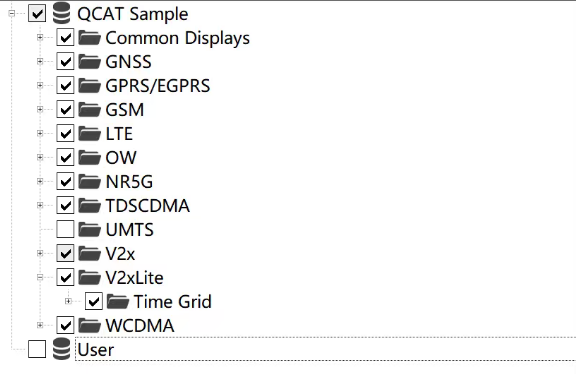
我导出的前半段数据是正常的,到了一个地方之后导出的数据就变成空的了,然后工作区变成了默认,接下来导出的就是这些默认的数据
然后学长开始了漫长的尝试找回丢失的工作区的四处找人和等待, 索性 User 工作区有备份 (但是有些旧了); Ajax 工作区则在这篇文章的前面我备份过, 于是没有出什么大问题. 但是数据没跑完, 学长又重来了一遍.
还是跑一半炸了
不过无所谓,感觉数据已经不少了。。。。
妈的这个QCAT
Q哈基米
Q耄耋
爱猫TV启动
看来学长也非常喜爱 QCAT 啊~
cute cat
简称QCAT